Redis Nedir ve Nasıl Kullanılır
Redis
Redis is a structure used as a mesaj broker, keep data in memory, caching and as a database. Redis support more than one data types. Using Redis, you keep data permanently, get it’s replica and use lua script. Also Redis provide high availability via redis sentinel and automatically data partitioning with redis cluster.
Redis works fast because it uses memory to keep data. Also depends in your case, you can persist your data in your system with periodicaly dumping.
You can use redis with programming languages. You can see supportting languages in this link.
Redis Installation
In this topic will explain redis installation on linux server. To do this we need redis installation files and a few commands.You can install th redis by following the commands below. Also this intallastion will do on Rhel8 OS platform. You can use below command to install on Rhel7 OS platform.
Step1:
We We will install the redis5 version.To do this, obtain the redis installation files with command below.
wget https://download.redis.io/releases/redis-5.0.10.tar.gzStep2:
Decompress the dowlanded files.
tar -zxvf redis-5.0.10.tar.gzStep3:
Go opened redis source code folder and complie source code. Before complie you make sure be installed neccassary packages. To do this you should install “Development Tools”.
yum group install "Development Tools"cd redis-5.0.10makemake installStep4:
Create redis working directory, service file and other settings with command below
mkdir /etc/rediscp redis.conf /etc/redis/redis.confvim /etc/redis/redis.confYou should change below settings in redis.conf file.
daemonize no
supervised systemd
logfile /var/log/redis/redis.log
vim /usr/lib/systemd/system/redis.service[Unit]
Description=Redis persistent key-value database
After=network.target
[Service]
ExecStart=/usr/local/bin/redis-server /etc/redis/redis.conf --supervised systemd
ExecStop=/usr/local/bin/redis-cli shutdown
Type=notify
User=redis
Group=redis
RuntimeDirectory=redis
RuntimeDirectoryMode=0755
[Install]
WantedBy=multi-user.targetmkdir /var/lib/redismkdir /var/log/redis/Step4:
Redis user add and change folder permission.
useradd redischown -R redis:redis /etc/redis /var/lib/redis /var/log/redis/ /usr/lib/systemd/system/redis.serviceStep5:
Enable redis service and check redis service status
systmctl daemon-reloadsystemctl enable redissystemctl start redissystemctl status redis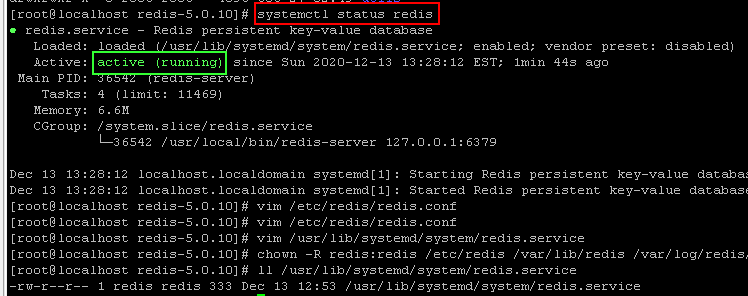
That’s it, Have nice works…